
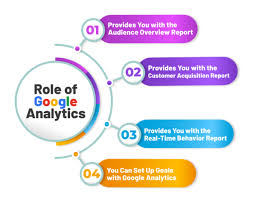
Google Analytics and Digital Marketing: Turning Data into Better Decisions
Digital marketing creates a steady stream of information: where visitors come from, which pages they view, what they click and whether they complete an action. Google Analytics helps businesses make sense of that information. Used thoughtfully, it can show how marketing activity contributes to business goals and where there may be opportunities to improve.
What is Google Analytics?
Google Analytics is a web and app analytics platform that collects and reports information about user interactions. Its current generation, Google Analytics 4 (GA4), is built around events. An event can represent an action such as viewing a page, clicking a button, watching a video or completing a purchase.
Analytics does not explain everything about a visitor or their motivations. Instead, it offers evidence about patterns in behaviour. Combining that evidence with customer feedback, sales data and other research can provide a more complete picture.
How Google Analytics supports digital marketing
Understanding where visitors come from
Reports can help marketers assess how people arrive at a website, including through organic search, paid advertising, social media, email and referrals from other websites. This makes it easier to compare channels and investigate which ones are bringing relevant visitors.
For clearer reporting, use consistent campaign tracking. UTM parameters can identify the source, medium and campaign associated with a link. Agree naming conventions before launching campaigns, and apply them consistently to avoid fragmented or confusing reports.
Measuring engagement and key actions
Visits alone do not indicate whether marketing is working. GA4 can record meaningful actions, such as submitting an enquiry form, signing up for a newsletter or making a purchase. Businesses can mark selected events as key events and use them to assess progress towards their objectives.
Choose actions that genuinely matter to the organisation. A content publisher might focus on newsletter registrations, while an online retailer may prioritise purchases and revenue. Tracking too many minor interactions can make reporting harder to interpret.
Improving landing pages and user journeys
Analytics can help identify pages that attract visitors, the routes people take through a site and points where they leave. If a campaign brings substantial traffic but few enquiries, for example, marketers can review whether the landing page matches the advert, communicates a clear benefit and makes the next step easy to find.
These observations should be treated as prompts for investigation rather than proof of a problem. A high exit rate may be expected on a page that answers a visitor’s question immediately. The purpose of the data is to guide sensible questions and tests.
Evaluating campaign performance
By comparing campaign traffic with key events and business outcomes, marketers can assess whether activity is delivering value. Useful measures may include conversion rate, cost per acquisition and revenue, where the necessary data is available and configured appropriately.
Attribution reports can offer different ways of describing how credit for a conversion is assigned across touchpoints. No attribution model perfectly captures the full influence of every interaction. Use attribution as one perspective, and consider it alongside campaign costs, customer research and longer-term results.
Getting started with GA4
- Set clear objectives. Decide what the website or app needs to achieve, such as generating qualified enquiries, selling products or encouraging sign-ups.
- Define key events. Identify the actions that indicate progress towards those objectives and decide how they should be measured.
- Check the implementation. Ensure the tracking tag is installed correctly and that events and any associated values are recorded as intended.
- Use campaign parameters consistently. Apply agreed UTM conventions to links in advertising, email and other campaigns where appropriate.
- Test before relying on reports. Check that important events fire once, with accurate details, and that internal or unwanted traffic is handled appropriately.
- Review and act. Create a regular reporting routine, look for meaningful changes and turn findings into specific improvements or experiments.
Privacy, consent and data quality
Analytics should be used responsibly. Organisations need to understand the privacy and data-protection requirements that apply to their activities and audiences. This may include providing clear information, obtaining consent where required and configuring analytics to respect users’ choices. Requirements vary by jurisdiction and implementation, so seek suitable legal or privacy advice where necessary.
Data quality matters too. Incorrect event setup, inconsistent campaign names, duplicate tracking or unfiltered internal visits can distort reports. Documenting the measurement plan and checking the setup regularly helps teams interpret results with greater confidence.
Common mistakes to avoid
- Focusing on page views or visitor numbers without connecting them to business goals.
- Changing campaign names and tracking conventions from one activity to another.
- Assuming that correlation proves a marketing channel caused a result.
- Making decisions from very small data samples or short-term fluctuations.
- Collecting data without a clear purpose or appropriate privacy safeguards.
- Setting up tracking once and never checking whether it still works.
Make analytics part of the marketing process
Google Analytics is most useful when it supports a cycle of planning, measurement and improvement. Set objectives, collect relevant data, interpret the results in context and test changes. Over time, this approach can help digital marketing teams understand what is working, refine the customer experience and allocate effort more effectively.
Top 10 FAQs About Google Analytics in Digital Marketing
- Is Google digital marketing free?
- Why is Google getting rid of Google Analytics?
- How do I use Google Analytics for marketing?
- What is the role of Google Analytics and Google Ads in digital marketing?
- How is data analytics used in digital marketing?
- What is GA4 in digital marketing?
- How Digital Marketers use Google Analytics?
- What does a marketer do in Google Analytics?
- What is Google Analytics for digital marketing?
- What is Google Analytics digital marketing?
Is Google digital marketing free?
Some Google digital marketing tools are free: Google Analytics can be used at no charge, and businesses can create organic listings on Google Search and a Google Business Profile. However, paid options such as Google Ads charge for advertising, and some advanced tools or services may also have costs. So, digital marketing through Google can be free, but the overall cost depends on the channels and resources you choose.
Why is Google getting rid of Google Analytics?
Google isn’t getting rid of Google Analytics; it has phased out Universal Analytics in favour of Google Analytics 4 (GA4). Universal Analytics stopped processing standard data in July 2023, with its final version properties ceasing processing in July 2024. GA4 uses an event-based measurement model designed for websites and apps, and offers updated reporting and privacy controls. Businesses that still rely on analytics should use GA4 or consider another suitable platform, while checking that their setup meets relevant privacy and consent requirements.
How do I use Google Analytics for marketing?
Use Google Analytics 4 (GA4) to understand how people find and use your website, and whether your marketing is helping you meet your goals. Set up tracking for important actions—such as purchases, enquiry submissions or newsletter sign-ups—then use consistent UTM tags on campaign links to compare traffic from channels such as email, social media and paid adverts. Review acquisition, engagement and conversion reports to spot what is working and where visitors may be dropping off; use those findings to improve campaigns and landing pages, and keep checking that tracking is accurate. Make sure your setup also respects applicable privacy and consent requirements.
What is the role of Google Analytics and Google Ads in digital marketing?
Google Analytics and Google Ads serve complementary roles in digital marketing. Google Ads helps businesses reach potential customers through paid advertising and manage campaigns, budgets and targeting. Google Analytics measures what people do after arriving at a website or app, such as viewing content, submitting an enquiry or making a purchase. When configured and linked appropriately, the platforms can help marketers assess how advertising contributes to meaningful outcomes and make better-informed campaign decisions. Their data should be interpreted alongside business goals, privacy requirements and other sources of customer insight.
How is data analytics used in digital marketing?
Data analytics helps digital marketers understand how people discover and interact with a brand online, and whether campaigns are meeting their objectives. By examining information such as traffic sources, page engagement, conversions and campaign costs, marketers can identify what is working, spot areas for improvement and make better-informed decisions about where to invest their budget. Tools such as Google Analytics can reveal useful patterns, but the findings should be interpreted in context and used responsibly, with appropriate privacy and consent practices.
What is GA4 in digital marketing?
GA4, or Google Analytics 4, is Google’s analytics platform for measuring how people interact with websites and apps. In digital marketing, it helps businesses understand where visitors come from, what content they engage with and whether they complete important actions, such as making a purchase or submitting an enquiry. GA4 uses event-based measurement, allowing marketers to track interactions and assess campaign performance. When configured responsibly and with appropriate privacy safeguards, it can inform decisions about advertising, content and the user experience.
How Digital Marketers use Google Analytics?
Digital marketers use Google Analytics to understand how people find and interact with a website or app. They can compare traffic sources such as search, social media, email and paid advertising, track important actions like purchases or enquiry submissions, and assess which campaigns contribute to their goals. These insights can highlight opportunities to improve landing pages, user journeys and marketing spend. Marketers should interpret the data in context, check that tracking is configured correctly and respect applicable privacy and consent requirements.
What does a marketer do in Google Analytics?
A marketer uses Google Analytics to understand how people find and use a website or app, and how digital campaigns contribute to business goals. They review traffic sources, engagement and key events such as purchases, enquiries or sign-ups; compare campaign performance; and look for opportunities to improve landing pages and the customer journey. They may also set up campaign tracking and reports, while checking that measurement is accurate and respects applicable privacy requirements.
What is Google Analytics for digital marketing?
Google Analytics helps digital marketers understand how people find and use a website or app. It can show which channels bring visitors, what content they engage with and whether they complete important actions, such as making a purchase or submitting an enquiry. By analysing these insights alongside campaign costs and business goals, marketers can assess performance and make more informed decisions about where to improve. Results depend on accurate tracking and should be interpreted in line with applicable privacy and consent requirements.
What is Google Analytics digital marketing?
Google Analytics digital marketing means using Google Analytics to measure and improve online marketing activity. The platform helps businesses understand how people find and use their websites or apps, which campaigns bring in visitors, and whether those visitors complete valuable actions such as making a purchase or submitting an enquiry. By analysing this data alongside campaign costs and business goals, marketers can make better-informed decisions about where to focus their efforts.