
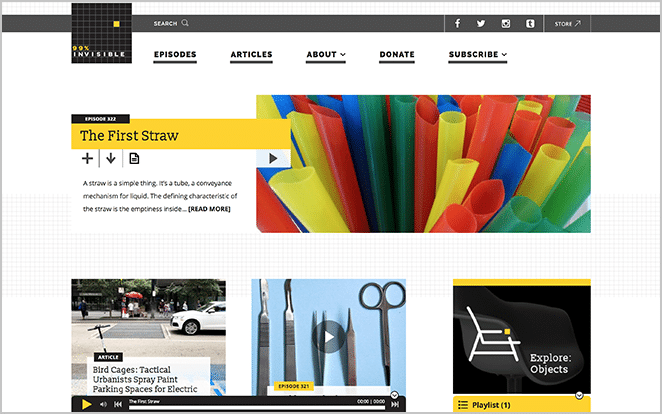
WordPress Web Design: Creating a Website That Works
A well-designed website is more than an attractive collection of pages. It should help visitors find what they need, make your business easy to understand and support your goals—whether that means generating enquiries, selling products or sharing information. WordPress web design brings visual design and practical functionality together on one of the world’s most widely used website platforms.
What is WordPress web design?
WordPress web design is the process of planning, designing and building a website using WordPress. It can involve choosing or creating a theme, organising content, adding features and making sure the site works well across different devices.
WordPress is flexible enough for many kinds of website, from a simple portfolio or blog to a company website or online shop. A design can be built around a pre-made theme, customised to suit a brand, or developed from scratch. The right approach depends on the project’s needs, budget and plans for the future.
Why choose WordPress?
One of WordPress’s main strengths is that it gives website owners control over their content. Once a site is set up, authorised users can usually update text, images and pages through the administration area without needing to write code.
- Flexible: Themes and plugins can add layouts and features to suit different requirements.
- Content-friendly: Pages, posts and media can be managed through a central dashboard.
- Scalable: A website can be developed further as an organisation’s needs change.
- Widely supported: There is a large community of developers and service providers familiar with the platform.
WordPress itself is not a complete solution to every website challenge. Good results also depend on thoughtful design, reliable hosting, suitable extensions and regular maintenance.
What makes a good WordPress website?
A clear structure
Visitors should be able to understand what a website offers and where to find key information. A simple navigation menu, descriptive page titles and a logical page structure make it easier to move around the site. Important actions, such as making an enquiry or viewing products, should be straightforward to find.
A design that reflects the brand
Colour, typography, imagery and layout all contribute to a brand’s identity. A consistent visual style helps a website feel professional and recognisable. Design choices should also support readability: decorative effects are most useful when they do not get in the way of the content.
Responsive layouts
People browse the web on phones, tablets, laptops and desktop computers. Responsive design allows a website’s layout to adapt to different screen sizes. Menus should remain easy to use, text should be comfortable to read and buttons should be practical to tap on a touchscreen.
Accessibility
An accessible website is easier for more people to use, including visitors who rely on assistive technology. Helpful practices include using clear headings, providing alternative text for meaningful images, maintaining sufficient colour contrast and ensuring that interactive elements can be used with a keyboard. Accessibility is best considered throughout the design process rather than added as an afterthought.
Performance
Slow pages can frustrate visitors and make it harder for them to complete tasks. Optimised images, carefully selected plugins, efficient code and suitable hosting can all help improve performance. A fast website also provides a better experience for people using mobile connections.
WordPress web design and search visibility
Search engines need to understand a website’s content and structure. A well-planned WordPress site can make that work easier, but installing a plugin alone will not guarantee strong search rankings. Useful foundations include descriptive page titles, clear headings, relevant page content, sensible internal links and a site that works well on mobile devices.
Content should be written for people first. Answering visitors’ questions clearly and keeping information accurate can make a site more useful, while also helping search engines understand what each page is about.
The WordPress design process
A successful project usually begins with planning. Before design work starts, it is worth identifying the audience, the purpose of the website and the actions visitors should be able to take.
- Define the goals: Agree what the website needs to achieve and how success will be measured.
- Plan the content: List the pages required and decide what information each should include.
- Develop the design: Create a visual direction that reflects the brand and supports a clear user journey.
- Build the website: Set up WordPress, implement the design and add the necessary functionality.
- Test before launch: Check the site on different devices and browsers, review links and forms, and look for accessibility or performance issues.
- Maintain and improve: Keep WordPress, themes and plugins up to date, back up the site and review its performance over time.
Choosing a theme and plugins
Themes influence a website’s appearance and layout, while plugins add specific features. It can be tempting to install a plugin for every possible function, but too many extensions—or poorly maintained ones—can affect security, compatibility and performance. Choose tools that meet a genuine need, check that they are maintained and remove anything no longer in use.
A theme should be selected for its suitability, not just its appearance. Consider whether it is responsive, accessible, regularly updated and flexible enough for the content the site needs to display.
Keeping a WordPress website healthy
A website needs ongoing care after launch. Regular updates can address security and compatibility issues, while backups provide a way to restore the site if something goes wrong. It is also sensible to review user accounts, check forms and links, and confirm that key pages remain accurate.
For organisations that do not have the time or technical experience to handle these tasks, a maintenance plan can help keep the website secure and dependable.
Conclusion
WordPress web design combines a flexible content management system with the planning and creativity needed to make a website useful. By focusing on clear navigation, responsive design, accessibility, performance and ongoing maintenance, businesses and organisations can create a site that serves visitors well and is ready to grow with them.
Frequently Asked Questions About WordPress Web Design in the UK: Costs, Timelines, DIY Updates, Suitability for Businesses, Mobile Compatibility, and Maintenance Needs
- How much does WordPress web design cost in the UK?
- How long does it take to design and build a WordPress website?
- Can I update my WordPress website myself after it has been built?
- Is WordPress suitable for small businesses and online shops?
- Will my WordPress website work on mobile phones and tablets?
- Do WordPress websites need ongoing maintenance and security updates?
How much does WordPress web design cost in the UK?
The cost of WordPress web design in the UK varies depending on the size and complexity of the website, the level of custom design and any required features, such as online booking or e-commerce. A simple brochure site may cost a few hundred to a few thousand pounds, while a bespoke website with advanced functionality can cost several thousand pounds or more. When comparing quotes, check what is included—such as content entry, hosting, training, maintenance and VAT—as these can affect the overall cost.
How long does it take to design and build a WordPress website?
The time it takes to design and build a WordPress website depends on its size, functionality and how quickly content and feedback are provided. A straightforward website may take a few weeks, while a larger or more customised project—such as an online shop or a site with bespoke features—can take several months. Planning, design, development, testing and revisions all contribute to the timescale, so agreeing the scope and providing materials promptly can help keep the project on track.
Can I update my WordPress website myself after it has been built?
Yes. WordPress makes it straightforward to update many parts of your website yourself, including text, images, blog posts and some page content, using its dashboard—no coding required for routine changes. The exact level of control depends on how the site has been built, so it’s helpful to ask your designer for a brief handover or training session. More complex changes, such as modifying the design, adding custom features or troubleshooting technical issues, may require a developer.
Is WordPress suitable for small businesses and online shops?
Yes. WordPress can be a good choice for small businesses and online shops, offering flexible design options and tools to manage pages, products and content. With the WooCommerce plugin, it can support online sales, including payments and stock management. The right setup depends on your needs, budget and technical resources, so consider hosting, security, maintenance and any ongoing costs when planning your website.
Will my WordPress website work on mobile phones and tablets?
Yes. A WordPress website can be designed to work on mobile phones and tablets, with a responsive layout that adapts to different screen sizes. This helps keep text readable, menus easy to use and buttons simple to tap. The finished site should be tested on a range of devices to check that pages load and function as intended.
Do WordPress websites need ongoing maintenance and security updates?
Yes. WordPress websites need ongoing maintenance to keep them secure, reliable and compatible with current browsers and technologies. This includes updating WordPress, themes and plugins, applying security fixes, backing up the site and checking that key features such as forms and links still work. Regular maintenance can help prevent vulnerabilities and reduce the risk of unexpected problems; updates should be carried out carefully, with a recent backup available in case anything goes wrong.