
How Much Does Web Design Cost in the UK?
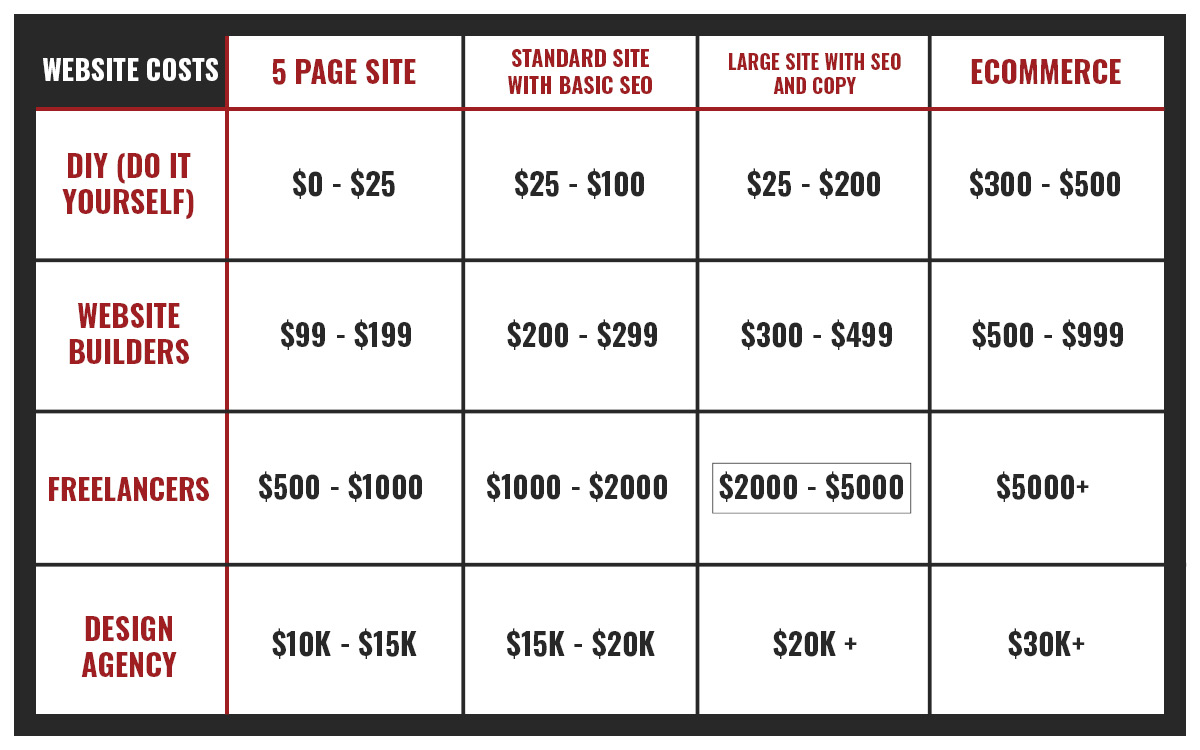
The cost of web design in the UK can range from a few hundred pounds for a simple, template-based website to tens of thousands of pounds for a bespoke digital project. The right budget depends on what the site needs to do, how much content it will contain and the level of design and development involved.
There is no single price that suits every business. A small brochure website for a local service provider has very different requirements from a large online shop or a customer portal. The figures below are indicative, rather than fixed quotes, and may vary by provider and project. Check whether a quote includes VAT.
Typical web design costs
- DIY or website-builder site: £100–£1,500
A practical option for individuals or very small businesses with straightforward needs. Costs may include a subscription, domain name, premium theme and any paid add-ons. You will generally provide the content and do much of the setup yourself.
- Freelancer-built small business site: £1,000–£5,000
This may cover a customisable design, a handful of pages and basic features such as a contact form. The price depends on the freelancer’s experience and how much content, design work and technical support you need.
- Agency-designed brochure website: £3,000–£12,000
An agency project may include discovery, brand-led design, development, content support, testing and training. Costs rise when the site needs a larger number of page layouts or integrations.
- E-commerce website: £5,000–£30,000+
An online shop can require product and payment setup, delivery rules, stock management, customer accounts and links to other systems. A small shop using an established platform will usually cost less than a bespoke store with complex requirements.
- Complex or bespoke website: £15,000–£100,000+
Platforms with user accounts, booking tools, custom dashboards, advanced search or links to business systems require more planning and development. Large projects may be priced in stages.
What affects the cost?
Design and branding
A site built around your brand, audience and business goals takes more work than one using a standard theme. The design process may include research, wireframes, visual concepts and revisions. If your brand identity also needs to be created or refreshed, that may be priced separately.
Number of pages and content
More pages can mean more design, writing and development. A site with several reusable page layouts is often more cost-effective than one where every page needs a unique design. Supplying polished text, images and other assets can reduce project time, although professional copywriting and photography may improve the result.
Features and integrations
Contact forms and basic analytics are relatively straightforward. Features such as online booking, membership areas, product filtering, multilingual content or connections to a customer relationship management system can add significant development and testing time.
Accessibility, SEO and performance
Accessibility and search engine optimisation should be considered from the outset. This may include clear page structure, descriptive links, mobile-friendly layouts, fast-loading pages and search-friendly metadata. The exact work depends on the site and should be set out in the project scope.
Who builds the website?
Freelancers, small studios and larger agencies have different pricing and ways of working. A higher quote does not automatically mean a better fit. Compare relevant experience, the proposed process, what is included and how support will work after launch.
Remember the ongoing costs
The initial design and development fee is only part of the total cost of owning a website. Allow for recurring or occasional expenses such as:
- domain name and web hosting;
- website platform, theme or plugin subscriptions;
- maintenance, backups, security updates and technical support;
- content updates, copywriting and new photography;
- payment processing fees for online sales; and
- marketing, analytics or other third-party tools.
Hosting and maintenance costs vary widely. Ask whether support is charged as a monthly retainer, an annual plan or by the hour, and find out exactly what each option covers.
How to get an accurate quote
Before requesting proposals, write down the site’s purpose, target audience, essential pages and must-have features. Include examples of websites you like, details of any systems the site must connect to, and whether you will provide the content.
When comparing quotes, check that each one explains:
- the deliverables and number of design revisions;
- who is responsible for copy, images and other content;
- which platform and third-party services will be used;
- the project timetable and payment stages;
- who owns the website, domain and design files;
- what testing, training and launch support are included; and
- the cost of ongoing hosting, maintenance and changes.
Finding the right budget
A well-planned website is an investment in how people find and understand your business. Rather than choosing the cheapest quote, look for a solution that meets your current needs, can grow with your organisation and has transparent ongoing costs. A clear brief and realistic priorities will help you get useful proposals and avoid paying for features you do not need.
7 Essential Tips for Managing Web Design Costs Effectively
- Set a clear budget before requesting quotes.
- Compare itemised quotes, not just headline prices.
- Check whether hosting and domain fees are included.
- Agree what pages and features the price covers.
- Ask about ongoing maintenance costs.
- Keep designs simple to manage costs.
- Get payment milestones in writing.
Set a clear budget before requesting quotes.
Set a clear budget before requesting quotes so designers can recommend a solution that fits your needs and available funds. A realistic budget also helps you prioritise essential features, compare proposals on a like-for-like basis and avoid spending time on options that are either too basic or beyond your means. Remember to allow for ongoing costs, such as hosting, maintenance and software subscriptions, as well as the initial design and development fee.
Compare itemised quotes, not just headline prices.
Compare itemised quotes rather than headline prices when choosing a web designer. A detailed quote should show what’s included, such as research, design, development, copywriting, testing and post-launch support. This makes it easier to compare like for like, spot additional costs and understand whether a lower price leaves essential work out of scope.
Check whether hosting and domain fees are included.
When comparing web design quotes, check whether hosting and domain fees are included in the price or billed separately. Hosting keeps your website online, while a domain name is its web address; both may involve recurring charges. Ask what the fees cover, when they are due and who controls the accounts, so you can budget accurately and retain access to your website if you change providers.
Agree what pages and features the price covers.
Before work begins, agree exactly which pages and features the quoted price covers. List the planned pages, such as the home, about, services and contact pages, and specify features such as enquiry forms, booking tools or online payments. This helps you compare quotes fairly, prevents misunderstandings and makes it clear how any additions or changes will affect the final cost.
Ask about ongoing maintenance costs.
Ask about ongoing maintenance costs before agreeing to a web design project. Hosting, software updates, security checks, backups and technical support may be charged separately from the initial build, either as a monthly or annual fee or on an hourly basis. Find out exactly what each plan includes, how extra work is priced and whether you can manage routine updates yourself. This helps you budget for the website’s full cost and avoid unexpected bills after launch.
Keep designs simple to manage costs.
Keeping your website design simple is an effective way to manage costs. A clear layout, a consistent colour palette and a small set of reusable page templates take less time to design, build and maintain than lots of unique features and layouts. Focus on the elements visitors need most, and add extra functionality only when it supports a clear business goal. A simpler site can also be easier to use, faster to load and more straightforward to update.
Get payment milestones in writing.
Agree payment milestones in writing before work begins. The contract should state how much is due at each stage, what work or deliverables trigger payment, and when invoices must be paid. For example, payments might be linked to project start, design approval and website launch. Clear terms help both parties manage cash flow, track progress and avoid misunderstandings about when payment is expected.