
WordPress: A Flexible Platform for Building Websites
WordPress is a popular platform for creating and managing websites. It began as a blogging tool and has grown into a flexible content management system (CMS) used for everything from personal blogs and business websites to online shops and publications.
How WordPress works
A website built with WordPress is managed through an administration area. From there, you can write and organise content, upload images, change the site’s appearance and manage users. You do not need to write code to carry out many common tasks, although technical knowledge can be useful for more advanced customisation.
WordPress is open-source software. This means its source code is available for people to use, study and adapt under the terms of its licence. A large community contributes to its development and creates resources to help site owners.
WordPress.org and WordPress.com
The names WordPress.org and WordPress.com are often confused, but they refer to different ways of using WordPress.
- WordPress.org provides the WordPress software, which you can install with a web hosting provider. You generally have greater control over your site, including its files, hosting and choice of extensions.
- WordPress.com is a hosted service. It takes care of much of the technical setup, with the available features depending on the plan you choose.
The right option depends on your needs, budget and willingness to manage the technical side of a website.
Themes and plugins
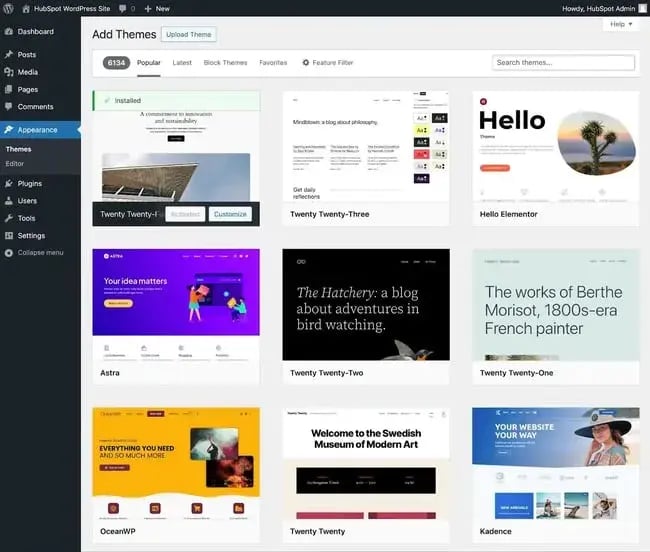
Themes control the design and layout of a WordPress site. There are thousands of free and paid themes, as well as options for creating a custom design. A good theme should suit your content, work well on mobile devices and receive regular updates.
Plugins add features to a site. They can provide contact forms, e-commerce tools, backups, search engine optimisation features and much more. Plugins make WordPress adaptable, but installing too many—or choosing ones that are poorly maintained—can affect performance, security and reliability. It is wise to use only the extensions you need and check when they were last updated.
What can you build with WordPress?
WordPress can be used for many kinds of websites, including:
- Blogs and personal websites
- Business and portfolio sites
- News and editorial publications
- Membership and community websites
- Online shops, using e-commerce extensions
- Educational and resource websites
Its suitability depends on the project. A straightforward website may be quick to set up, while a complex site with bespoke features may require a developer and ongoing technical support.
Security, maintenance and performance
Like any website platform, WordPress needs regular care. Site owners should keep the WordPress software, themes and plugins up to date, use strong passwords and give users only the access they need. Regular backups are important too, so the site can be restored if something goes wrong.
Performance also matters. Choosing reliable hosting, compressing images, using a well-built theme and limiting unnecessary plugins can help pages load more quickly. A fast, dependable site is more pleasant for visitors and can support better search visibility.
Accessibility and search visibility
Good website design considers people with different needs and devices. Clear headings, descriptive links, readable text, keyboard-friendly navigation and meaningful alternative text for images can make a site easier to use. Accessibility should be considered throughout a project, rather than added as an afterthought.
WordPress provides tools for organising content, but search visibility still depends on useful, well-structured information and sound technical practices. Descriptive page titles, clear URLs and a logical heading structure can help both visitors and search engines understand a site.
Is WordPress right for you?
WordPress offers a strong combination of flexibility, a broad selection of themes and plugins, and a large support community. It can be a good choice for individuals and organisations that want control over their content and room to grow.
Before choosing it, consider the time and budget available for setup, updates, hosting and security. With sensible planning and regular maintenance, WordPress can provide a practical foundation for a wide range of websites.
7 Key Advantages of WordPress
- Easy to use
- Flexible and customisable
- Thousands of themes
- Extensive plugin library
- Suitable for many website types
- Large support community
- Open-source software
Six Key Drawbacks of Using WordPress
- Requires regular updates and maintenance.
- Can be vulnerable if poorly secured.
- Too many plugins can slow a site.
- Some themes and plugins cost extra.
- Customisation may require coding skills.
- Self-hosted sites need separate hosting.
Easy to use
WordPress is easy to use, even for people with little or no web design experience. Its clear dashboard makes it simple to create and edit pages, publish posts, add images and manage content without writing code. As a website grows, users can also add features through themes and plugins, making it straightforward to tailor the site to their needs.
Flexible and customisable
One of WordPress’s biggest advantages is its flexibility. With thousands of themes and plugins, you can customise your website’s design and features to suit your needs, whether you’re creating a simple blog, a business site or an online shop. As your project grows, WordPress can be adapted with new tools and functionality, without requiring you to rebuild the entire site.
Thousands of themes
WordPress offers thousands of themes, making it easy to find a design that suits your website’s purpose and personality. Whether you’re creating a business site, blog, portfolio or online shop, you can choose from a wide range of layouts and styles, then customise colours, fonts and other details to reflect your brand. Many themes are also designed to work across mobile phones, tablets and desktop computers, helping your site look good on different screens.
Extensive plugin library
One of WordPress’s biggest advantages is its extensive library of plugins. These add-on tools make it easy to expand a website’s features, from contact forms and search engine optimisation tools to online shops, booking systems and security features. With thousands of options available, site owners can tailor WordPress to their needs without building every feature from scratch. It is best to choose plugins carefully, keeping them up to date and using only those that are well maintained and genuinely useful.
Suitable for many website types
One of WordPress’s greatest strengths is its versatility. It can power a wide range of websites, from personal blogs and business pages to portfolios, news publications, membership communities and online shops. With a choice of themes and plugins, you can tailor a site to your needs and add features as your project grows.
Large support community
One of WordPress’s biggest advantages is its large support community. Because millions of people use the platform, it is easy to find tutorials, discussion forums, guides and troubleshooting advice online. Whether you are setting up a site for the first time or dealing with a technical issue, the community’s shared knowledge can help you find answers and make the most of WordPress.
Open-source software
One of WordPress’s key advantages is that it is open-source software. Its code is freely available to use, study and adapt, giving developers the flexibility to customise websites and create new features. A global community also contributes themes, plugins, documentation and support, helping WordPress continue to evolve. Because it is not tied to a single proprietary platform, site owners can choose their own hosting provider and retain greater control over how their website is built and managed.
Requires regular updates and maintenance.
WordPress requires regular updates and maintenance to keep a website secure, reliable and running smoothly. The WordPress software, themes and plugins need to be updated, while backups and security checks should be carried out routinely. If updates are neglected, the site may become vulnerable to security issues or compatibility problems, so owners need to set aside time for ongoing upkeep or arrange support.
Can be vulnerable if poorly secured.
WordPress can be vulnerable to security threats if it is poorly maintained or secured. Out-of-date software, weak passwords and untrusted or neglected plugins and themes can create opportunities for attackers. Regular updates, strong login credentials, reliable backups and carefully chosen extensions help reduce these risks.
Too many plugins can slow a site.
Using too many WordPress plugins can slow a website, particularly if they add unnecessary features or are poorly optimised. Each plugin may require extra code to load, putting more pressure on the server and making pages take longer to appear. Choose well-maintained plugins carefully, remove ones you no longer need and test your site’s speed after making changes.
Some themes and plugins cost extra.
Some WordPress themes and plugins come with additional costs. Although many free options are available, premium tools may require a one-off purchase or ongoing subscription, and some charge extra for updates or support. These costs can add up, so it is worth checking the pricing and renewal terms before choosing a theme or plugin.
Customisation may require coding skills.
Although WordPress offers many themes and plugins, customising a site beyond their built-in options can require coding skills. Tailoring layouts, changing how a theme works or adding bespoke features may involve HTML, CSS, PHP or JavaScript. This can make advanced changes challenging for beginners and may mean hiring a developer, adding time and cost to a project.
Self-hosted sites need separate hosting.
One drawback of self-hosted WordPress is that the software does not include web hosting. You’ll need to choose and pay for a separate hosting provider, and take responsibility for tasks such as setting up your site, managing renewals and checking that your hosting can meet its performance and storage needs. This gives you greater control, but adds cost and maintenance compared with an all-in-one hosted service.